Git
- Basics
- Stash / Worktree
- Merge, Rebase, Reset, Clean
- Hooks
- GUI / visualize
- Github / Gitlab
- Special usecases
Basics
Bare basics
semantic versioning
clone
git clone <url>clone an arbitrary repository
add
git add .add all files to stage
commit
git commit -m "some commit message"commit staged changes with inline commit message
checkout -> switch
-
switch: git-scm.com
git switch -c <branch-name>create new branch and switch to it
-
checkout:
git checkout <branch-name>checkout the branch with given namegit checkout -b <branch-name>create and checkout a new branch with given name
remotes
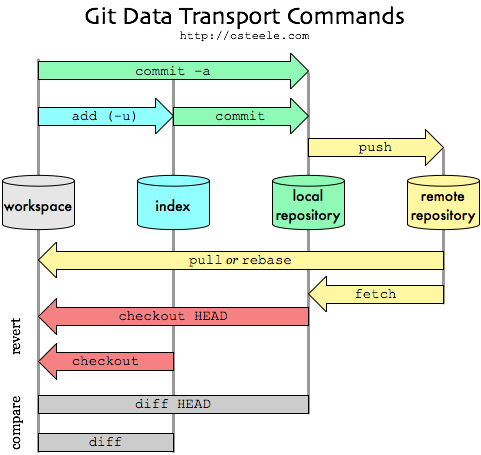
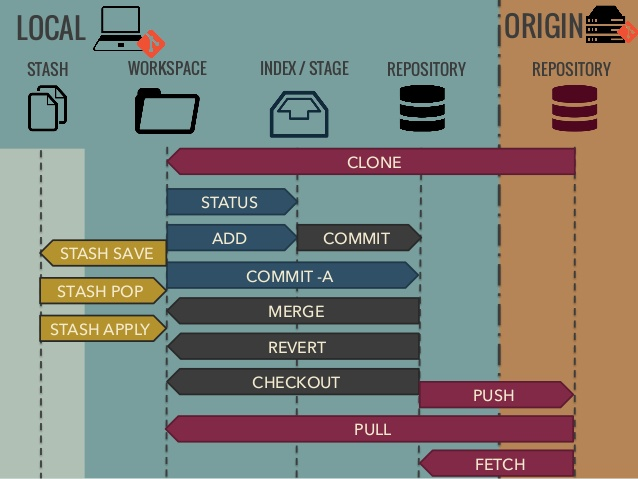
git pushgit fetchgit pull
log
git log
--graphshow visual graph in the terminal--alllist all branches, not only current branch
alias in ~/.gitconfig:
[alias]
lg1 = log --graph --abbrev-commit --decorate --format=format:'%C(bold blue)%h%C(reset) - %C(bold green)(%ar)%C(reset) %C(white)%s%C(reset) %C(dim white)- %an%C(reset)%C(auto)%d%C(reset)' --all
lg2 = log --graph --abbrev-commit --decorate --format=format:'%C(bold blue)%h%C(reset) - %C(bold cyan)%aD%C(reset) %C(bold green)(%ar)%C(reset)%C(auto)%d%C(reset)%n''          %C(white)%s%C(reset) %C(dim white)- %an%C(reset)'
lg = lg1
config
local
git config user.email "your_email@abc.example"
git config user.name "Example Name"
filemode
ignore filemod:
git config (--global) core.fileMode false
lineend
on linux: git config --global core.autocrlf input
on windows: git config --global core.autocrlf true
to keep LF as end of line in the repo. check git docs
store credentials
- in plaintext in
~/.git-credentialsgit config --global credential.helper store- add personal accesstoken to credetinal files:
git credential approve << EOF protocol=https host=gitlab.com username=private-token password=<<your personal access token>> EOF - content in files:
# ~/.gitconfig [user] email = myMail@mymail.com name = Me [credential] helper = store # ~/.git-credentials https://private-token:............@gitlab.com - in cache
git config credential.helper 'cache --timeout=<timeout>'- timeout in seconds (default 900 sec)
others
Stash / Worktree
git stash
git worktree
add new worktree
git worktree add <path> <branch>
--forceforce creating a new worktree (e.g. create new worktree with already checked out branch)
list worktrees
git worktree list
remove unused worktree
git worktree remove [-f] <worktree>
- Unclean worktrees or ones with submodules can be removed with
--forceor-f.
Merge, Rebase, Reset, Clean
merge vs rebase
https://www.atlassian.com/git/tutorials/merging-vs-rebasing
Make the current Git branch a master branch
git checkout better_branch
git merge --strategy=ours master    # keep the content of this branch, but record a merge
git checkout master
git merge better_branch             # fast-forward master up to the merge
rename branch (local and remote)
-
git branch -m master main- rename master to main -
git push -u origin main- push branch with new name - set remote default branch in remote repo.
- protect new brunch, unprotect old branch (in remote repo)
-
git push origin --delete master- delete branch in remote repo
reset last commit(s)
- undo the last commit (changes will be in place)
-
git reset --soft HEAD~ -
git reset --soft HEAD~2undo the last two commits
merge (force remote)
- drop local changes (incl commits)
git fetch --all
git reset --hard origin/master
mergetool
- installed merge tool like meld necessary
-
sudo apt install meld - configure it: https://stackoverflow.com/questions/34119866/setting-up-and-using-meld-as-your-git-difftool-and-mergetool
-
[diff]
    tool = meld
[difftool]
    prompt = false
[difftool "meld"]
    cmd = meld "$LOCAL" "$REMOTE"

[merge]
    tool = meld
[mergetool "meld"]
    # Choose one of these 2 lines (not both!) explained below.
    cmd = meld "$LOCAL" "$MERGED" "$REMOTE" --output "$MERGED"
 #   cmd = meld "$LOCAL" "$BASE" "$REMOTE" --output "$MERGED"
- merge
git checkout master git merge branch_name- start mergetool:
git mergetool
- start mergetool:
- diff
-
git difftool BRANCH_NAME -- FILE
-
clean up
git clean -d -x ( -n | -i | -f )
will remove untracked files
- including directories (
-d) - files ignored by git (
-x) -
-n,-ior-fmust be specified- perform a dry-run (
-n) - interactive mode (
-i) - delete all without asking (
-f)
- perform a dry-run (
Hooks
git hooks
pre-commit-msg
This example adds the branch name as prefix to the commit message:
- create the file
~/.githooks/prepare-commit-msg#!/bin/sh # # Automatically adds branch name every commit message. # NAME=$(git branch | grep '*' | sed 's/* //' | cut -d '_' -f 1) echo "[$NAME]"': '$(cat "$1") > "$1" - make the file executable
sudo chmod +x ~/.githooks/prepare-commit-msg - execute
git config --global core.hooksPath ~/.githooksto use this hook at every repository
pre-push example
-
create the file
~/.githooks/pre-pushwhile true; do read -r -p "Have you executed 'composer test' already? (y|n): " yn < /dev/tty case $yn in [Yy]*) exit 0 ;; [Nn]*) echo "\e[31mPlease execute the command first \e[39m"; exit 1; ;; *) echo "Please answer [y]es or [n]o." ;; esac done -
execute
git config --global core.hooksPath ~/.githooksto use this hook at every repository
GUI / visualize
CLI ui
show logs in a graph
git log --oneline --graph --color --all --decorate
for linux use alias gg="git log --oneline --graph --color --all --decorate" in ~/.bashrc
lazygit
GUI
Github / Gitlab
Common
create patch from commit
add
-
.patchfor a patch file or -
.difffor a plain diff file
as a suffix onto commit links or merge request links.
examples:
Gitlab special
gitlab personal access token
- go to
https://gitlab.com/-/profile/personal_access_tokens- rights:
read_repositoryandwrite_repository - add line in
~/.git-credentials:https://private-token:{{token}}@gitlab.com
- rights:
Special usecases
rename branch
-
git checkout <old_name> -
git branch -m <new_name>(move/rename the local branch) -
git push origin -u <new_name>(push new branch to remote) -
git push origin --delete <old_name>(remove old branch from remote)
clone repo in existing folder
- with clone:
git clone https://myrepo.com/git.git temp
mv temp/.git code/.git
rm -rf temp
- without clone (use fetch):
git init
git remote add origin {{url_of_clone_source}}
git fetch origin
git checkout master # delete files that are blocking