
Basics
Bare basics
semantic versioning
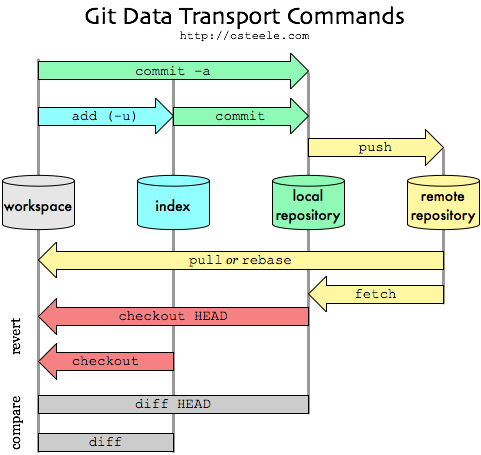
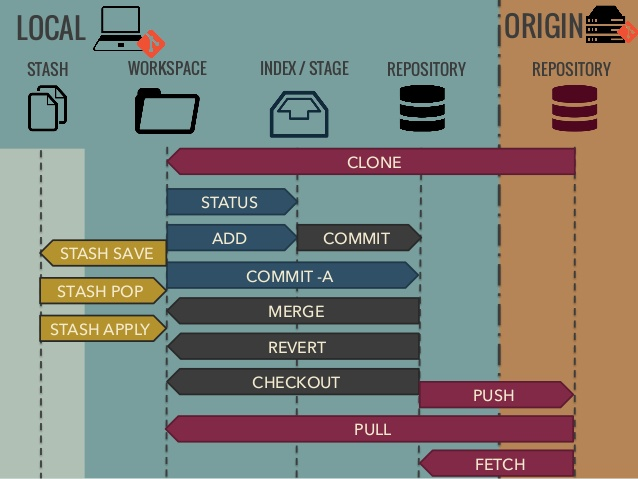
clone
git clone <url>clone an arbitrary repository
add
git add .add all files to stage
commit
git commit -m "some commit message"commit staged changes with inline commit message
checkout -> switch
-
switch: git-scm.com
git switch -c <branch-name>create new branch and switch to it
-
checkout:
git checkout <branch-name>checkout the branch with given namegit checkout -b <branch-name>create and checkout a new branch with given name
remotes
git pushgit fetchgit pull
log
git log
--graphshow visual graph in the terminal--alllist all branches, not only current branch
alias in ~/.gitconfig:
[alias]
lg1 = log --graph --abbrev-commit --decorate --format=format:'%C(bold blue)%h%C(reset) - %C(bold green)(%ar)%C(reset) %C(white)%s%C(reset) %C(dim white)- %an%C(reset)%C(auto)%d%C(reset)' --all
lg2 = log --graph --abbrev-commit --decorate --format=format:'%C(bold blue)%h%C(reset) - %C(bold cyan)%aD%C(reset) %C(bold green)(%ar)%C(reset)%C(auto)%d%C(reset)%n''          %C(white)%s%C(reset) %C(dim white)- %an%C(reset)'
lg = lg1
config
local
git config user.email "your_email@abc.example"
git config user.name "Example Name"
filemode
ignore filemod:
git config (--global) core.fileMode false
lineend
on linux or wsl: git config --global core.autocrlf input
to keep LF as end of line in the repo. check git docs
add changed files normalized: git add --renormalize .
fix all files:
sudo apt update && sudo apt install dos2unix
find . -type f -print0 | xargs -0 dos2unix
prevent future errors with .gitattributes:
store credentials
- in plaintext in
~/.git-credentialsgit config --global credential.helper store- add personal accesstoken to credetinal files:
git credential approve << EOF protocol=https host=gitlab.com username=private-token password=<<your personal access token>> EOF - content in files:
# ~/.gitconfig [user] email = myMail@mymail.com name = Me [credential] helper = store # ~/.git-credentials https://private-token:............@gitlab.com - in cache
git config credential.helper 'cache --timeout=<timeout>'- timeout in seconds (default 900 sec)
misc
use other ssh key for one repo:
set a host entry in the ssh config file ~/.ssh/config:
Host github-my-project
 HostName github.com
 User git
 IdentityFile ~/.ssh/keys/id_rsa
clone the repository git clone git@github.com-work:[my project path].git
or set the
others
No comments to display
No comments to display