Basics
semantic versioning
https://semver.org/
clone
-
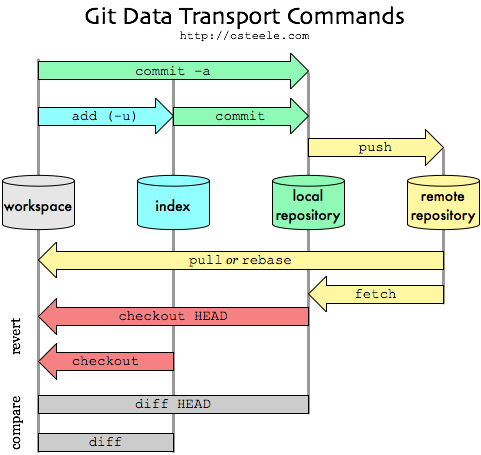
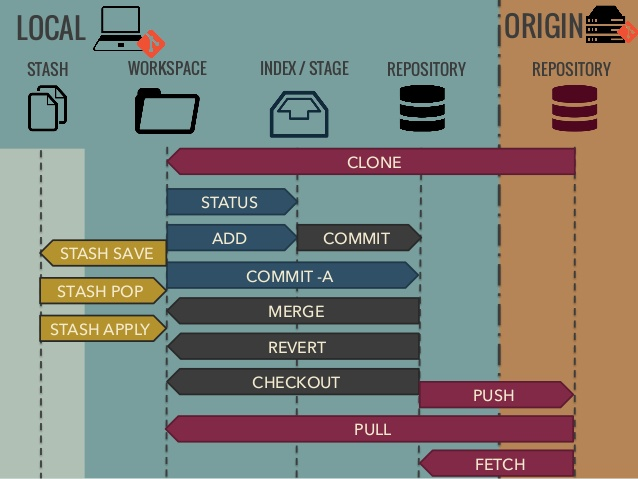
git clone <url>clone an arbitrary repository
add
-
git add .add all files to stage
commit
-
git commit -m "some commit message"commit staged changes with inline commit message
commit in (new) branch
-
git stash push -
git checkout -b <branch_name> -
git stash pop
branches
-
git checkout <branch-name>checkout the branch with given name -
git checkout -b <branch-name>create and checkout a new branch with given name
remotes
-
git push -
git fetch -
git pull
rename branch
-
git checkout <old_name> -
git branch -m <new_name> -
git push origin -u <new_name> -
git push origin --delete <old_name>
config
filemode
ignore filemod:
git config core.fileMode false
store credentials
- in plaintext in
~/.git-credentials-
git config --global credential.helper store - add personal accesstoken to credetinal files:
git credential approve << EOF protocol=https host=gitext.fronius.com username=private-token password=<<your personal access token>> EOF - content in files:
# ~/.gitconfig [user] email = myMail@fronius.com name = Me [credential] helper = store # ~/.git-credentials https://private-token:............@gitext.fronius.com -
- in cache
-
git config credential.helper 'cache --timeout=<timeout>' - timeout in seconds (default 900 sec)
-
gitlab
gitlab personal access token
- go to
https://gitlab.com/-/profile/personal_access_tokens- rights:
read_repositoryandwrite_repository - add line in
~/.git-credentials:https://private-token:{{token}}@gitlab.com
- rights:
clone repo in existing folder
- with clone:
git clone https://myrepo.com/git.git temp
mv temp/.git code/.git
rm -rf temp
- without clone (use fetch):
git init
git remote add origin {{url_of_clone_source}}
git fetch origin
git checkout master # delete files that are blocking
others